All products / Business apps
Business apps
Secure Password Manager Pro
Secure Password Manager Pro: Offline HTML App, Local Encryption, Password Generator (Digital Download)
$9.99 one-time, on Etsy
Instant download after checkout. Payment, delivery and support are handled by Etsy.
What you get
# 🔐 Secure Password Manager Pro
**Stop forgetting passwords, reusing weak logins, or keeping sensitive information in unsecured notes and spreadsheets.**
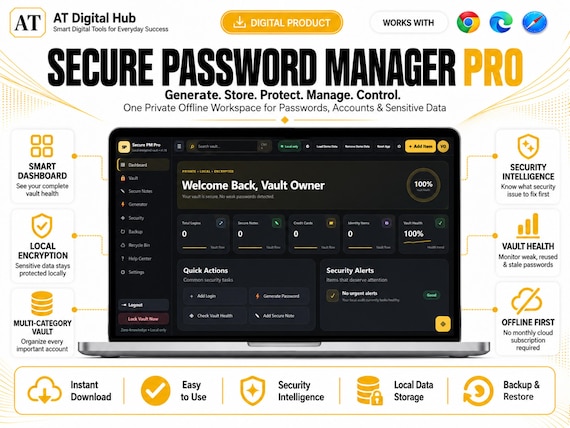
Secure Password Manager Pro is a premium **offline password manager, password tracker, password organizer, password vault, and password generator** designed to help you organize your digital life in one private workspace.
Unlike a basic printable password tracker or password log, this is an interactive **HTML password manager web app** that runs locally in your browser and gives you a secure digital organizer for passwords, login details, private notes, cards, identities, banking information, Wi-Fi credentials, API keys, software licenses, and more.
Your vault is designed around local encryption and offline use—without requiring a recurring password-manager subscription.
---
## ✨ WHAT'S INCLUDED
Your instant digital download includes the complete **Secure Password Manager Pro HTML application**, featuring:
### 🔐 Secure Password Vault
Organize important information across multiple dedicated categories:
• Website & App Logins
• Secure Notes
• Credit & Debit Cards
• Personal Identities
• Bank Accounts
• Wi-Fi Credentials
• Software Licenses
• Server / SSH Accounts
• API Keys
• Crypto Wallet Information
• Passport / ID Documents
• Membership Accounts
• Custom Secure Records
---
### 🔑 Built-In Password Generator
Generate stronger passwords directly inside the app with:
• Adjustable password length
• Uppercase letters
• Lowercase letters
• Numbers
• Special characters
• Ambiguous-character removal
• Passphrase generation
• Password entropy estimation
• One-click clipboard copy
• Automatic clipboard clearing options
No separate password generator website is required.
---
### 🛡️ Local Security Intelligence
Secure Password Manager Pro includes a built-in **Security Intelligence** assistant that analyzes your locally stored vault information.
It can help identify:
• Weak passwords
• Reused passwords
• Old or stale passwords
• Accounts without 2FA
• Overall Vault Health
• Security priorities
• Accounts that should be updated first
Ask questions such as:
“What should I fix first?”
“Which passwords are reused?”
“Show my weak passwords.”
“How is my 2FA coverage?”
The Security Intelligence feature works locally from your vault analysis and does not require an external AI subscription.
---
## 📊 Vault Health Dashboard
Get an easy visual overview of your password security with:
• Overall Vault Health Score
• Weak Password Count
• Reused Password Count
• Stale Password Count
• 2FA Coverage
• Security status cards
• Mini analytics graphs
• Risk composition charts
• Protection coverage indicators
Perfect for anyone managing multiple online accounts.
---
## 🔒 Quick PIN Protection
Stored passwords remain hidden by default.
A separate **Quick PIN** is used before protected passwords can be revealed or copied.
Revealed passwords automatically return to a masked state after a short period for additional privacy.
---
## 🔎 Smart Password & Login Organizer
Quickly locate stored information using:
• Global vault search
• Live search suggestions
• Categories
• Tags
• Favorites
• Security filters
• Pagination
• Recent items
No more searching through notebooks, spreadsheets, browser notes, or scattered password lists.
---
## 📝 Dedicated Secure Notes
Store private information such as:
• Recovery codes
• Door codes
• Important reference numbers
• Wi-Fi information
• Emergency notes
• Private instructions
• Personal security information
Secure Notes have their own dedicated section for easier organization.
---
## ♻️ Recycle Bin
Deleted records don't have to disappear immediately.
The built-in Recycle Bin allows you to:
• Restore deleted records
• Review deleted items
• Permanently remove individual records
• Empty the entire Recycle Bin
---
## 🔄 Encrypted Backup & Restore
Create an encrypted backup of your password vault for safekeeping.
Features include:
• Export encrypted backup
• Import existing backup
• Backup reminders
• Master-password verification
• Local recovery information
Keeping a separate encrypted backup is strongly recommended when using an offline password keeper.
---
## 🔐 Master Password + Recovery
During setup you create:
• Master Password
• Quick PIN
• Security Question
• Recovery Answer
You can also create your own custom security question.
If you forget your master password, the locally configured recovery workflow can help you create a new one when the correct recovery answer is provided.
Master Password and Quick PIN can also be updated later from Settings.
---
## 🎨 9 PREMIUM THEMES
Personalize your password vault with multiple visual themes, including:
• Clean Minimalist
• Warm Paper
• Nordic Frost
• Spring Mint
• Sunset Rose
• Obsidian Void
• Cyber Neon
• Emerald Luxe
• Twilight Slate
Cyber Neon is included as the default theme.
You can also choose different interface fonts and density settings.
---
## 🌍 MULTI-LANGUAGE INTERFACE
Built with multilingual and RTL support, including:
• English
• Spanish
• French
• German
• Portuguese
• Japanese
• Arabic
• Urdu
Arabic and Urdu include right-to-left interface support.
---
## 💻 HOW IT WORKS
1. Purchase and download your digital files.
2. Extract the downloaded ZIP folder.
3. Open the app through a compatible modern browser or upload it to your own web hosting.
4. Create your Master Password, Quick PIN, and recovery question.
5. Choose whether to load optional demo data.
6. Start adding and organizing your passwords and secure records.
The app is designed for modern desktop, laptop, tablet, and mobile browsers.
For the best browser and PWA experience, use the files through a local web server or standard HTTP/HTTPS web hosting.
---
## 🔐 PRIVACY-FIRST DESIGN
Secure Password Manager Pro is designed as an **offline password manager**.
The vault uses local browser technologies for encrypted storage rather than depending on a seller-operated cloud database.
That means:
✓ No monthly subscription required
✓ No seller account required
✓ No external password database required
✓ Offline-first workflow
✓ Local encrypted vault storage
✓ Local Security Intelligence
You stay in control of your files and vault.
---
## 👤 PERFECT FOR
• Freelancers
• Remote workers
• Small business owners
• Content creators
• Students
• Professionals
• Families
• Developers
• Privacy-conscious users
• Anyone managing many online accounts
• Anyone tired of recurring password-manager subscriptions
---
## 📦 DIGITAL PRODUCT — INSTANT DOWNLOAD
This listing is for a **digital download only**.
No physical product will be shipped.
Because this is an HTML-based digital application rather than a printable password book, basic familiarity with downloading, extracting ZIP files, and opening files in a web browser is recommended.
---
## ⚠️ IMPORTANT SECURITY NOTE
No password manager can eliminate every security risk.
Always use strong unique credentials, keep your operating system and browser updated, enable two-factor authentication where available, maintain encrypted backups, and protect access to your device.
Secure Password Manager Pro should not replace professional enterprise security infrastructure where regulated or highly sensitive environments require specialized systems.
---
## ❤️ LIKE THE PRODUCT?
If Secure Password Manager Pro makes managing your digital accounts easier, please consider leaving a review—it helps our shop continue developing useful digital tools.
You can also **favorite the shop** to see future productivity, security, and digital organization products.
Thank you for supporting independent digital products!
Buy on Etsy
**Stop forgetting passwords, reusing weak logins, or keeping sensitive information in unsecured notes and spreadsheets.**
Secure Password Manager Pro is a premium **offline password manager, password tracker, password organizer, password vault, and password generator** designed to help you organize your digital life in one private workspace.
Unlike a basic printable password tracker or password log, this is an interactive **HTML password manager web app** that runs locally in your browser and gives you a secure digital organizer for passwords, login details, private notes, cards, identities, banking information, Wi-Fi credentials, API keys, software licenses, and more.
Your vault is designed around local encryption and offline use—without requiring a recurring password-manager subscription.
---
## ✨ WHAT'S INCLUDED
Your instant digital download includes the complete **Secure Password Manager Pro HTML application**, featuring:
### 🔐 Secure Password Vault
Organize important information across multiple dedicated categories:
• Website & App Logins
• Secure Notes
• Credit & Debit Cards
• Personal Identities
• Bank Accounts
• Wi-Fi Credentials
• Software Licenses
• Server / SSH Accounts
• API Keys
• Crypto Wallet Information
• Passport / ID Documents
• Membership Accounts
• Custom Secure Records
---
### 🔑 Built-In Password Generator
Generate stronger passwords directly inside the app with:
• Adjustable password length
• Uppercase letters
• Lowercase letters
• Numbers
• Special characters
• Ambiguous-character removal
• Passphrase generation
• Password entropy estimation
• One-click clipboard copy
• Automatic clipboard clearing options
No separate password generator website is required.
---
### 🛡️ Local Security Intelligence
Secure Password Manager Pro includes a built-in **Security Intelligence** assistant that analyzes your locally stored vault information.
It can help identify:
• Weak passwords
• Reused passwords
• Old or stale passwords
• Accounts without 2FA
• Overall Vault Health
• Security priorities
• Accounts that should be updated first
Ask questions such as:
“What should I fix first?”
“Which passwords are reused?”
“Show my weak passwords.”
“How is my 2FA coverage?”
The Security Intelligence feature works locally from your vault analysis and does not require an external AI subscription.
---
## 📊 Vault Health Dashboard
Get an easy visual overview of your password security with:
• Overall Vault Health Score
• Weak Password Count
• Reused Password Count
• Stale Password Count
• 2FA Coverage
• Security status cards
• Mini analytics graphs
• Risk composition charts
• Protection coverage indicators
Perfect for anyone managing multiple online accounts.
---
## 🔒 Quick PIN Protection
Stored passwords remain hidden by default.
A separate **Quick PIN** is used before protected passwords can be revealed or copied.
Revealed passwords automatically return to a masked state after a short period for additional privacy.
---
## 🔎 Smart Password & Login Organizer
Quickly locate stored information using:
• Global vault search
• Live search suggestions
• Categories
• Tags
• Favorites
• Security filters
• Pagination
• Recent items
No more searching through notebooks, spreadsheets, browser notes, or scattered password lists.
---
## 📝 Dedicated Secure Notes
Store private information such as:
• Recovery codes
• Door codes
• Important reference numbers
• Wi-Fi information
• Emergency notes
• Private instructions
• Personal security information
Secure Notes have their own dedicated section for easier organization.
---
## ♻️ Recycle Bin
Deleted records don't have to disappear immediately.
The built-in Recycle Bin allows you to:
• Restore deleted records
• Review deleted items
• Permanently remove individual records
• Empty the entire Recycle Bin
---
## 🔄 Encrypted Backup & Restore
Create an encrypted backup of your password vault for safekeeping.
Features include:
• Export encrypted backup
• Import existing backup
• Backup reminders
• Master-password verification
• Local recovery information
Keeping a separate encrypted backup is strongly recommended when using an offline password keeper.
---
## 🔐 Master Password + Recovery
During setup you create:
• Master Password
• Quick PIN
• Security Question
• Recovery Answer
You can also create your own custom security question.
If you forget your master password, the locally configured recovery workflow can help you create a new one when the correct recovery answer is provided.
Master Password and Quick PIN can also be updated later from Settings.
---
## 🎨 9 PREMIUM THEMES
Personalize your password vault with multiple visual themes, including:
• Clean Minimalist
• Warm Paper
• Nordic Frost
• Spring Mint
• Sunset Rose
• Obsidian Void
• Cyber Neon
• Emerald Luxe
• Twilight Slate
Cyber Neon is included as the default theme.
You can also choose different interface fonts and density settings.
---
## 🌍 MULTI-LANGUAGE INTERFACE
Built with multilingual and RTL support, including:
• English
• Spanish
• French
• German
• Portuguese
• Japanese
• Arabic
• Urdu
Arabic and Urdu include right-to-left interface support.
---
## 💻 HOW IT WORKS
1. Purchase and download your digital files.
2. Extract the downloaded ZIP folder.
3. Open the app through a compatible modern browser or upload it to your own web hosting.
4. Create your Master Password, Quick PIN, and recovery question.
5. Choose whether to load optional demo data.
6. Start adding and organizing your passwords and secure records.
The app is designed for modern desktop, laptop, tablet, and mobile browsers.
For the best browser and PWA experience, use the files through a local web server or standard HTTP/HTTPS web hosting.
---
## 🔐 PRIVACY-FIRST DESIGN
Secure Password Manager Pro is designed as an **offline password manager**.
The vault uses local browser technologies for encrypted storage rather than depending on a seller-operated cloud database.
That means:
✓ No monthly subscription required
✓ No seller account required
✓ No external password database required
✓ Offline-first workflow
✓ Local encrypted vault storage
✓ Local Security Intelligence
You stay in control of your files and vault.
---
## 👤 PERFECT FOR
• Freelancers
• Remote workers
• Small business owners
• Content creators
• Students
• Professionals
• Families
• Developers
• Privacy-conscious users
• Anyone managing many online accounts
• Anyone tired of recurring password-manager subscriptions
---
## 📦 DIGITAL PRODUCT — INSTANT DOWNLOAD
This listing is for a **digital download only**.
No physical product will be shipped.
Because this is an HTML-based digital application rather than a printable password book, basic familiarity with downloading, extracting ZIP files, and opening files in a web browser is recommended.
---
## ⚠️ IMPORTANT SECURITY NOTE
No password manager can eliminate every security risk.
Always use strong unique credentials, keep your operating system and browser updated, enable two-factor authentication where available, maintain encrypted backups, and protect access to your device.
Secure Password Manager Pro should not replace professional enterprise security infrastructure where regulated or highly sensitive environments require specialized systems.
---
## ❤️ LIKE THE PRODUCT?
If Secure Password Manager Pro makes managing your digital accounts easier, please consider leaving a review—it helps our shop continue developing useful digital tools.
You can also **favorite the shop** to see future productivity, security, and digital organization products.
Thank you for supporting independent digital products!